Retro Bollywood Poster AI Photo Prompt: 30 Copy Paste Vintage Poster Prompts That Keep Your Face Unchanged
A retro Bollywood poster AI prompt turns your photo into a hand-painted film poster from the 1970s, 80s or 90s while keeping your face recognisable. This page has 30 free prompts sorted by decade and poster type. Copy any one, upload your photo, paste it into your AI tool, and the poster is generated in about a minute.
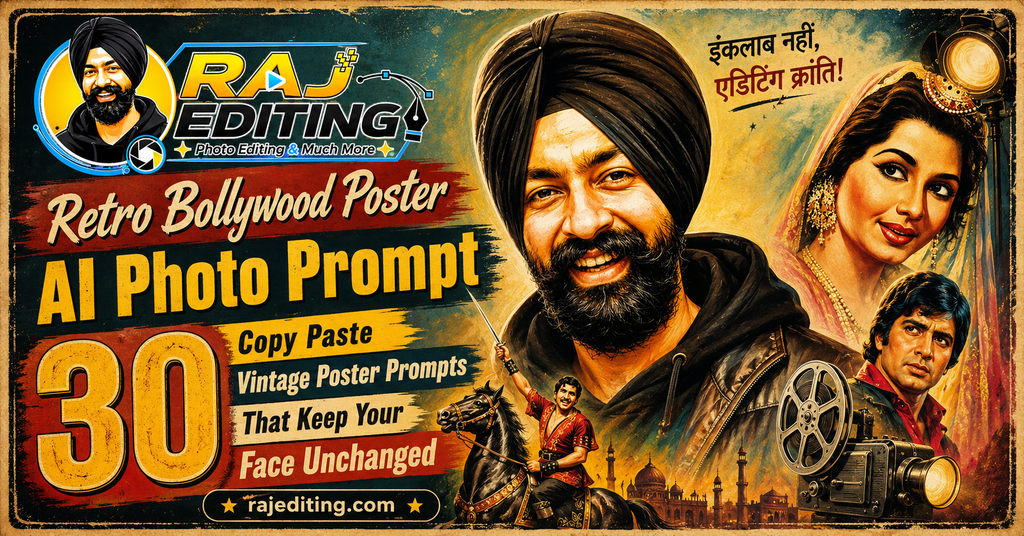
The detail that makes these work is asking for a painted finish rather than a photograph. Real posters of that era were painted by hand on canvas, so the prompts below name brush texture, flat colour blocks and paper ageing. Without those words you get a modern photo with a colour filter, which is not the same thing at all.
30 Retro Bollywood Poster AI Prompts (Copy and Paste)
Tap copy on any prompt and paste it after uploading your photo. Most of these leave blank space for a title, so you can add your own text afterwards in any editing app.
1970s Poster Styles
Oil painted, heavy brush texture, earthy palettes. The softest and most forgiving group if your source photo is not sharp.
1. Classic 70s Hand Painted Poster
Turn my photo into a 1970s Hindi film poster painted by hand in oil, with visible brush strokes, bold flat colour blocks in orange and brown, and a dramatic low angle. Leave empty space at the bottom for a title. Keep my face, features and expression exactly as in the uploaded photo. Authentic paper grain and slightly faded ink.
2. 70s Angry Young Man Poster
Style me as the lead of a 1970s action film poster: a wide collar shirt, tousled hair and a determined expression, painted in a bold poster style with strong shadows and a burnt orange background. Preserve my exact facial structure and expression from the original. Hand-painted texture, no photographic realism.
3. 70s Romantic Duet Poster
Create a 1970s romance film poster with me in soft-focus painted style, warm pastel tones, a floral border and a hazy dreamlike background. Keep my face and expression completely unchanged from the uploaded photo. Visible canvas texture and gentle colour bleeding at the edges typical of the period.
4. 70s Village Drama Poster
Place me on a hand-painted 1970s village drama poster with rural background elements, earthy ochre and green tones, and dramatic sky. Preserve my face, features and expression exactly. Thick paint texture, uneven colour, aged paper with fold marks and slight edge damage.
5. 70s Lobby Card Style
Render my portrait as a 1970s cinema lobby card: a rectangular painted panel with a decorative border, faded colours and small printed text areas left blank. Keep my face and expression identical to the original photo. Authentic offset printing dots and paper yellowing.
6. 70s Double Exposure Poster
Create a 1970s poster using a painted double exposure: my portrait large on one side with a smaller full-figure scene faded into the background. Warm sepia and orange palette. Preserve my exact facial features and expression. Hand-painted blending, no digital gradient look.
1980s Poster Styles
Airbrush, neon and saturated print. Strong contrast makes these read well as thumbnails and profile pictures.
7. 80s Neon Action Poster
Turn my photo into a 1980s action film poster with neon pink and cyan lighting, a dark background, bold geometric shapes and a strong rim light on my face. Keep my face, features and expression exactly as in the uploaded photo. Slight airbrush texture and visible print grain.
8. 80s Airbrush Portrait Poster
Render my portrait in 1980s airbrush poster style with smooth gradient shading, saturated colours and a soft glow around the edges. Preserve my exact facial structure and expression. Retain the airbrush look without making the skin plastic; keep believable facial detail throughout.
9. 80s Cassette Cover Style
Style my portrait as an Indian film soundtrack cassette cover from the 1980s: a square format, bold typography space at the top, saturated colour photograph with heavy print texture. Keep my face and expression completely unchanged. Authentic cardboard texture and slight misaligned colour printing.
10. 80s Disco Poster
Create a 1980s disco-themed poster with me under coloured stage lights, a mirror ball reflection pattern and strong magenta and blue tones. Preserve my face, features and expression exactly as uploaded. Painted poster style with visible halftone dots and slight registration offset.
11. 80s Family Drama Poster
Place me on a 1980s family drama poster with a warm domestic background, soft painted rendering and a decorative title band at the bottom left blank. Keep my facial features and expression identical to the original image. Faded reds typical of aged poster ink.
12. 80s VHS Cover Style
Render my portrait as a 1980s VHS cover: a bordered rectangular composition, saturated colours, a slight video-tape colour bleed and worn plastic sleeve texture over the top. Preserve my exact face and expression. Authentic wear marks along the edges.
1990s Romance Styles
Soft focus, warm saturation and hill station backgrounds. The most recognisable era for Indian audiences.
13. 90s Chiffon Romance Poster
Create a 1990s Hindi romance poster with soft-focus rendering, warm saturated colour and a hill station background with light haze. Keep my face, features and expression exactly as in the uploaded photo. Hand-painted finish with gentle glow around the highlights, typical of the period.
14. 90s Rain Song Poster
Style me on a 1990s rain sequence poster: wet hair, warm backlight through falling rain and a deep blue and amber palette. Preserve my exact facial structure and expression. Painted poster texture with visible brush work in the rain streaks, not photographic rain.
15. 90s College Romance Poster
Place me on a 1990s college romance film poster with a campus background, bright cheerful colours and a casual period outfit. Keep my face and expression completely unchanged from the original photo. Slight print grain and warm colour cast typical of 1990s poster printing.
16. 90s Snow Song Poster
Create a 1990s poster set in a snowy landscape with a warm woollen outfit, cool blue background and warm light on my face. Preserve my face, features and expression exactly as uploaded. Painted rendering with soft edges and gentle colour separation between warm and cool areas.
17. 90s Magazine Cover Portrait
Render my portrait as a 1990s Indian film magazine cover: bright even lighting, saturated background colour, glossy paper texture and blank space at the top for a masthead. Keep my facial features and expression identical to the original. Period-accurate print quality.
18. 90s Wedding Song Poster
Style me on a 1990s wedding song poster with heavy traditional clothing, marigold decoration and warm golden light. Preserve my exact face and expression from the uploaded photo. Hand-painted poster finish with rich saturated reds and visible canvas texture.
Action Poster Styles
High contrast dramatic compositions with space left for a title. These suit half body and full body photos better than close-ups.
19. Dusty Highway Action Poster
Create an action film poster with me standing on a dusty highway at sunset, strong backlight and dust in the air, rendered as a painted poster with high contrast. Keep my face, features and expression exactly as in the uploaded photo. Bold composition with blank space for a title.
20. Rain and Fire Action Poster
Place me on an action poster with rain falling and firelight from one side creating strong orange and blue contrast. Preserve my exact facial structure and expression. Painted poster rendering with dramatic shadow shapes and visible brush texture in the flames.
21. Silhouette Action Poster
Render me as a partial silhouette against a huge sunset sky on an action poster, with enough light on the face to keep it visible and recognisable. Keep my facial features and expression identical to the original photo. Bold flat colour blocking with painted grain.
22. Split Face Action Poster
Create a split-lighting action poster with warm light on one half of my face and deep shadow on the other, against a dark textured background. Preserve my face and expression exactly as uploaded. Hand-painted rendering with strong edge definition and no digital smoothness.
23. Train Chase Poster
Place me on an action poster with a moving train and a smoky station background, painted in a dramatic 1980s style with warm amber tones. Keep my face, features and expression exactly as in the uploaded photo. Visible motion streaks rendered as brush strokes.
24. Desert Standoff Poster
Style me on a desert action poster with sand dunes, a low harsh sun and long shadows, rendered as a painted poster with a limited ochre and blue palette. Preserve my exact face and expression. Aged paper texture with fold creases and slight edge damage.
Modern Retro Portraits
Not posters. These apply period film and print finishes to a normal portrait, which is the subtler option.
25. Retro Grain Studio Portrait
Create a modern studio portrait of me with a retro finish: warm faded colour, lifted blacks, heavy film grain and soft focus at the frame edges. Plain neutral backdrop with one soft key light. Keep my face, features and expression exactly as in the uploaded photo. Realistic skin texture retained under the grain.
26. Faded Kodak Colour Portrait
Render my portrait with a faded Kodak film colour profile: warm skin tones, slightly green shadows and soft highlight roll-off. Simple background with natural window light. Preserve my exact facial structure and expression. Authentic film grain, no digital sharpening.
27. Retro Passport Photo Style
Style my portrait as a vintage passport photograph: plain light background, flat frontal lighting, slightly faded colour and a printed border with rounded corners. Keep my face and expression completely unchanged from the original. Believable paper texture and slight print imperfections.
28. Old Studio Backdrop Portrait
Place me against a hand-painted studio backdrop of the kind used in old Indian photo studios, with warm even lighting and a formal seated pose. Preserve my face, features and expression exactly as uploaded. Faded colour, gentle vignette, authentic period studio feel.
29. Retro Newspaper Print Portrait
Render my portrait as a printed newspaper photograph with visible halftone dots, high contrast black and white and slight ink bleed on cheap paper. Keep my facial features and expression identical to the original image. Authentic period print artefacts, no clean digital edges.
30. Retro Album Cover Portrait
Create a retro music album cover portrait with a square composition, bold single-colour background, warm faded film tones and blank space for text at the bottom. Preserve my exact face and expression. Visible print texture and slightly offset colour registration.
How to Use These Prompts (Step by Step)
Every retro bollywood poster ai prompt above works the same way. The steps below take under a minute once you have done them once.
Step 1: Pick the right photo
Use a clear, well-lit photo where your face is fully visible and not covered by sunglasses or heavy shadow. Avoid images that already have a strong filter on them, because the model has to fight that filter before it can apply anything new. A plain phone photo taken near a window gives better results than a heavily edited one.
Step 2: Open your AI tool
Open Google Gemini, ChatGPT or any image editing model that accepts an uploaded photo along with a text instruction. Free accounts work for all the prompts on this page, though paid tiers usually return results faster and at a higher resolution.
Step 3: Upload the photo first
Upload the image before you paste the prompt. When the photo goes in first, the model treats your text as an edit instruction rather than a request to generate a new picture from scratch. This one habit fixes most identity problems.
Step 4: Paste the prompt and generate
Tap the copy button on any prompt above, paste it in, and send. Do not add extra words the first time. Run it exactly as written so you can see what the prompt alone produces before you start changing it.
Step 5: Fix one thing at a time
If something is wrong, send a short follow-up naming only that one problem, such as asking for the eyes to match the original more closely. Changing several things in one message is the most common reason the result drifts further away.
How to Write Your Own Prompt (The Formula)
Once you understand the structure, you can build any look you want instead of waiting for someone to publish it. Every prompt on this page follows the same six-part order, and the order matters because the model gives more weight to instructions that come first.
Subject
Who is in the photo. Say “me” or “the couple” so the model knows what it is editing rather than generating from nothing.
The change
The single main thing you want different. Outfit, background, or style. Put this second and keep it to one idea.
Style and mood
Cinematic, editorial, documentary, retro film, painted poster. This word does more work than any other in the prompt.
Lighting
Name the direction and quality. Soft morning light from the left. Hard side light. Warm backlight. Vague lighting is why most results look flat.
Background
Describe the place in one clear line. Too much detail here pulls attention away from the subject.
What must not change
The most important line. State that the face, features and expression stay exactly as uploaded. Without it the model quietly redraws your face.
Common Mistakes That Ruin the Result
Leaving out the preservation line
This is the single biggest cause of a result that does not look like you. These models generate a new image guided by your photo rather than editing pixels directly, so without an explicit instruction to keep your face unchanged, they will quietly adjust your jawline, skin tone or eye shape. Every prompt on this page ends with that line for a reason. Never delete it.
Writing a vague prompt
“Make this look better” gives the model complete freedom, and it will use that freedom in a direction you did not intend. Naming the outfit, the light and the background removes the guesswork. A longer, specific prompt almost always beats a short one in this kind of editing.
Changing five things at once
When a first result is close but not right, most people rewrite the whole prompt. That throws away everything that worked. Send one short correction instead, wait for the result, then send the next. Slow, single corrections land far closer than one big rewrite.
Using a low quality source photo
A blurry, dark or heavily compressed photo gives the model very little facial information to work with, so it fills the gaps by inventing detail. That invented detail is what people describe as the result “not looking like them”. Start with the sharpest photo you have.
Expecting identical results every time
These models are not deterministic. The same prompt run twice returns two slightly different images. This is normal and not a fault in the prompt. If the first attempt is off, simply run it again before you start editing the wording.
Ignoring the hands
Hands remain the weakest area for image models, especially in complex poses. If your photo has hands near the face or fingers overlapping, expect to run the prompt a few times. Choosing a photo where the hands are relaxed or out of frame avoids the problem entirely.
Asking for the poster text to be written
Image models still render text unreliably, especially in Devanagari. Every prompt here asks for blank space where the title would go. Add your own text afterwards in Canva or CapCut, where you control the font and it will actually be readable.
Frequently Asked Questions
Is this retro bollywood poster ai prompt free to use?
Yes. Every retro bollywood poster ai prompt on this page is free to copy and use. You do not need a paid subscription, and there is no signup on this site. The AI tools themselves have free tiers that handle all of these prompts, though paid plans return results faster and usually at a higher resolution.
Will the AI change my face?
It can, and that is exactly what the last line of every prompt prevents. These models generate a new image guided by your photo rather than editing the original pixels, so they need an explicit instruction to keep your facial features unchanged. If your face still shifts, send a short follow-up naming the specific feature that is wrong.
Which AI tool works best with these prompts?
For painted poster styles both Gemini and ChatGPT perform well, because a painted finish hides small facial inaccuracies that would be obvious in a photorealistic edit. Gemini still holds identity more closely. If you plan to add text inside the image rather than afterwards, ChatGPT handles in-image text better.
Can I use the results on Instagram commercially?
For personal posts, yes. For paid or client work, check two things first. Free tiers of some tools add a visible badge to the output, and an invisible watermark is often embedded regardless of tier. Also remember that permission from the AI tool does not override anyone else’s copyright or likeness rights.
Why does my result look different from the example?
Because these models are not deterministic and because your source photo is different from the one used to test the prompt. Lighting, angle and image quality in your original all affect the output. Run the prompt two or three times before deciding it does not work.
Do these prompts work in Hindi?
You can write prompts in Hindi or Hinglish and most current models will understand them. In practice, English prompts return more consistent results for this kind of detailed image editing, because the models were trained on far more English descriptions of lighting, fabric and camera terms.
How often is this page updated?
New prompts are added regularly, and existing ones are rewritten when a model update changes how they behave. AI image tools change quickly, and a prompt that worked perfectly three months ago can start producing odd results after an update.
Why does my poster look like a photo with a filter?
Because the painted-finish instruction was weakened or removed. Words like brush strokes, hand painted, canvas texture and flat colour blocks are what push the model away from photorealism. Keep those phrases in the prompt exactly as written.
Can I add my own name as the film title?
Yes, and that is the recommended approach. Generate the poster with blank title space using these prompts, then add your text in a separate app. You get a readable font, correct spelling, and full control over placement.
More Prompt Collections
- Saree AI Photo Prompts for Girls
- Attitude Boy AI Photo Prompts
- Romantic Couple AI Photo Prompts
- 3D Miniature Figurine AI Prompts
Every prompt on this page was written and checked by hand before publishing. If a retro bollywood poster ai prompt stops working after a model update, use the contact page and it will be corrected.