3D Miniature Figurine AI Photo Prompt: 30 Copy Paste Prompts That Turn Your Photo Into a Collectible Model
A 3D figurine AI photo prompt turns your photo into a small collectible model of yourself, complete with a display base, realistic plastic texture and studio lighting. This page has 30 free prompts covering desk figurines, boxed retail figures, dioramas, profession figurines and festival versions. Copy, upload your photo, paste, and it is done.
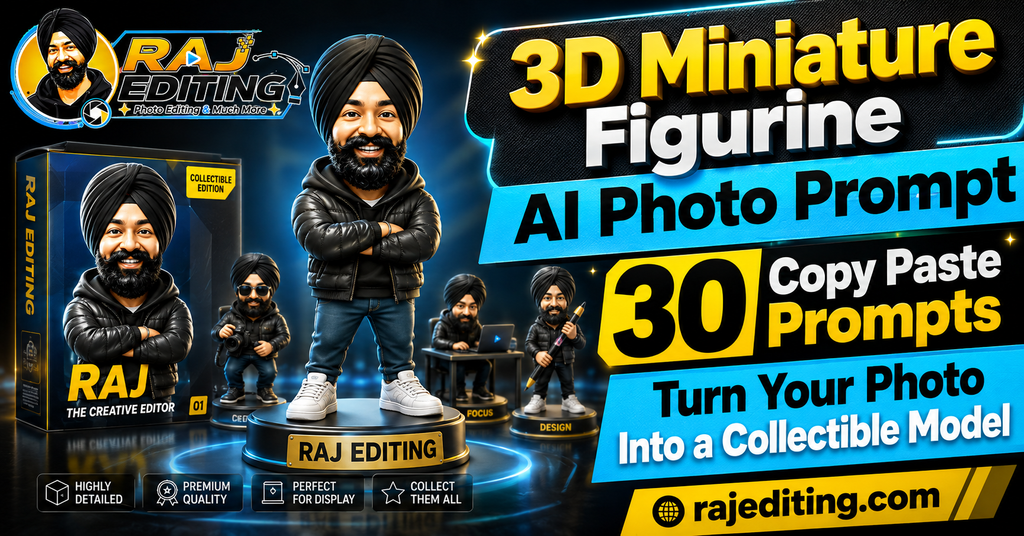
The three details that decide whether this looks convincing are scale, material and base. A figurine needs something around it for size reference, a believable plastic or vinyl surface rather than smooth digital shading, and a proper display base. Every prompt below specifies all three, which is why they hold up better than a short request for a figure.
30 3D Figurine AI Photo Prompts (Copy and Paste)
Tap copy on any prompt, upload your photo first, then paste. A full body or half body photo works better here than a close-up, because the model needs to see your build and clothing to sculpt the figure.
Desk Collectible Figurines
The standard version, placed on a real desk for scale. Start here if this is your first attempt.
1. Classic Desk Figurine
Turn my photo into a 1/7 scale collectible figurine of myself standing on a round black display base, placed on a wooden desk beside a keyboard and a coffee mug. Realistic PVC material with visible paint layers and a slight gloss. Keep my face, features and expression exactly as in the uploaded photo. Soft desk lamp lighting with accurate shadows.
2. Figurine with Acrylic Case
Create a detailed collectible figurine of me displayed inside a clear acrylic case on a bookshelf, with a small printed name plate on the front left blank. Preserve my exact facial features and expression. Realistic reflections and slight dust on the acrylic, believable scale against the books behind.
3. Hand Held Figurine Scale Shot
Show a small figurine of me being held between a thumb and finger, with a blurred room in the background for scale. Realistic plastic texture with fine paint detail. Keep my face and expression completely unchanged from the original photo. Correct depth of field and natural indoor lighting.
4. Matte Vinyl Figurine
Render me as a matte vinyl collectible figurine with slightly simplified proportions but an accurate face, standing on a hexagonal base. Preserve my exact facial structure and expression from the uploaded image. Soft studio lighting on a plain grey surface, realistic matte material response.
5. Chibi Style Figurine
Create a chibi-proportioned figurine of me with a large head and small body, but keep the face detailed and recognisable. Glossy painted finish on a white circular base. Keep my facial features and expression exactly as in the uploaded photo. Clean studio lighting with a soft shadow.
6. Metallic Bronze Statue
Turn me into a small bronze statue on a marble base, with realistic patina in the recessed areas and polished highlights on the raised surfaces. Preserve my face, features and expression exactly. Museum-style lighting from above with warm reflections on the metal.
Packaging and Box Shots
The figure shown inside retail packaging. These get the strongest reaction on social media because the packaging sells the illusion.
7. Figurine in Retail Box
Show a collectible figurine of me sealed inside a printed retail box with a clear plastic window, sitting on a shop shelf. Leave the box artwork areas blank for text. Keep my face, features and expression exactly as in the uploaded photo. Realistic cardboard print texture and plastic reflections.
8. Unboxing Scene
Create an unboxing scene with a figurine of me half removed from its box, tissue paper and packaging pieces around it on a table. Preserve my exact facial features and expression. Natural window light, realistic material contrast between the plastic figure and the paper.
9. Blister Pack Action Figure
Render me as a classic action figure sealed in a blister pack with a printed cardboard backing, small accessory pieces beside the figure. Keep my face and expression identical to the original photo. Authentic worn cardboard edges and slightly scratched plastic bubble.
10. Collector Edition Box Set
Show a premium collector edition box set containing a figurine of me plus a small stand and a booklet, arranged in foam inserts. Preserve my facial features and expression exactly as uploaded. Rich matte box finish with spot gloss detail, soft directional studio light.
11. Shelf Display with Price Tag
Place a boxed figurine of me on a toy store shelf among other blurred boxes, with a small blank price tag on the shelf edge. Keep my face and expression completely unchanged. Realistic fluorescent store lighting and believable depth in the background.
12. Mini Figure Blind Box
Create a small blind box style mini figure of me, standing beside its opened paper box on a plain pastel surface. Simplified body, detailed face. Preserve my exact facial structure and expression from the uploaded image. Soft even lighting with a gentle shadow.
Diorama Scenes
The figurine placed inside a built miniature environment. The most detailed group and the slowest to generate.
13. Miniature Street Diorama
Place a figurine of me inside a detailed miniature street diorama with a tiny shopfront, lamp post and cobbled road. Realistic model-making materials and scale. Keep my face, features and expression exactly as in the uploaded photo. Tilt-shift depth of field emphasising the miniature scale.
14. Miniature Office Diorama
Create a miniature office diorama with a figurine of me at a tiny desk with a small monitor and chair. Realistic model textures and correct scale relationships. Preserve my exact facial features and expression. Warm desk lamp lighting inside the diorama with accurate small shadows.
15. Miniature Café Scene
Show a figurine of me seated at a miniature café table with a tiny cup, surrounded by small plants and a model window. Keep my face and expression identical to the original photo. Handcrafted diorama materials, soft daylight through the model window, shallow depth of field.
16. Miniature Bike Garage
Place a figurine of me in a miniature garage diorama with a small motorcycle, tools on the wall and an oil-stained floor. Preserve my facial features and expression exactly as uploaded. Realistic weathering on the model surfaces and a single warm work light.
17. Miniature Study Room
Create a miniature study room diorama with a figurine of me reading beside a tiny bookshelf and a small lamp. Keep my face and expression completely unchanged from the original image. Cosy warm lighting, realistic paper and wood textures at model scale.
18. Miniature Terrace Garden
Show a figurine of me on a miniature terrace garden diorama with small potted plants, a tiny chair and a railing. Preserve my exact face and expression. Natural daylight on the diorama, realistic soil and foliage detail, gentle tilt-shift blur at the edges.
Profession Figurines
Figures built around a job with matching props and a themed base. Good for gifts and for personal branding posts.
19. Video Editor Figurine
Create a collectible figurine of me as a video editor, seated at a tiny desk with a small monitor showing a timeline, headphones around the neck. Keep my face, features and expression exactly as in the uploaded photo. Realistic painted plastic finish with fine detail on the equipment.
20. Photographer Figurine
Render me as a figurine holding a small camera with a strap, standing on a base shaped like a camera lens ring. Preserve my exact facial structure and expression. Detailed paint work on the camera body, soft studio lighting with a clean shadow.
21. Chef Figurine
Turn me into a figurine dressed as a chef with an apron and a small pan, standing on a base shaped like a chopping board. Keep my face and expression identical to the original photo. Realistic material separation between the fabric-painted apron and the glossy accessories.
22. Doctor Figurine
Create a figurine of me in a white coat with a stethoscope, standing on a plain white medical-style base. Preserve my facial features and expression exactly as uploaded. Clean matte finish on the coat, subtle gloss on the stethoscope, even studio lighting.
23. Teacher Figurine
Render me as a figurine holding a small book, standing beside a tiny blackboard on a wooden base with the board left blank. Keep my face and expression completely unchanged. Realistic scale detail and soft warm lighting from the upper left.
24. Musician Figurine
Create a figurine of me holding a small guitar, standing on a base shaped like a vinyl record. Preserve my exact face, features and expression from the uploaded image. Fine paint detail on the strings and fretboard, warm stage-style lighting with a coloured rim.
Festival and Cultural Figurines
Occasion versions with traditional clothing and decorated bases. These pair well with festival posts.
25. Diwali Festival Figurine
Create a collectible figurine of me in festive Indian clothing holding a tiny diya, standing on a base decorated with a small rangoli pattern. Keep my face, features and expression exactly as in the uploaded photo. Warm glow from the diya with realistic light falloff on the painted surface.
26. Holi Colours Figurine
Render me as a figurine in white clothing splashed with coloured powder, standing on a base scattered with small colour piles. Preserve my exact facial features and expression. Realistic powder texture on the paint and soft bright daylight.
27. Traditional Wedding Figurine
Turn me into a figurine in full traditional wedding attire with detailed painted embroidery and jewellery, on a base decorated with tiny marigolds. Keep my face and expression identical to the original photo. Fine gold paint detail and warm ceremonial lighting.
28. Classical Dancer Figurine
Create a figurine of me in a classical Indian dance pose with a detailed costume and jewellery, on a circular base with a temple pattern. Preserve my facial features and expression exactly as uploaded. Accurate anatomy in the pose and realistic painted fabric folds.
29. Cricket Player Figurine
Render me as a figurine in cricket whites holding a small bat, standing on a base shaped like a pitch. Keep my face and expression completely unchanged from the uploaded image. Realistic fabric paint texture and bright outdoor-style lighting with a clean shadow.
30. Village Farmer Figurine
Create a figurine of me in traditional rural clothing with a small tool, standing on a base textured like soil with tiny crop details. Preserve my exact face, features and expression. Weathered painted finish, warm afternoon lighting, realistic material contrast.
How to Use These Prompts (Step by Step)
Every 3d figurine ai photo prompt above works the same way. The steps below take under a minute once you have done them once.
Step 1: Pick the right photo
Use a clear, well-lit photo where your face is fully visible and not covered by sunglasses or heavy shadow. Avoid images that already have a strong filter on them, because the model has to fight that filter before it can apply anything new. A plain phone photo taken near a window gives better results than a heavily edited one.
Step 2: Open your AI tool
Open Google Gemini, ChatGPT or any image editing model that accepts an uploaded photo along with a text instruction. Free accounts work for all the prompts on this page, though paid tiers usually return results faster and at a higher resolution.
Step 3: Upload the photo first
Upload the image before you paste the prompt. When the photo goes in first, the model treats your text as an edit instruction rather than a request to generate a new picture from scratch. This one habit fixes most identity problems.
Step 4: Paste the prompt and generate
Tap the copy button on any prompt above, paste it in, and send. Do not add extra words the first time. Run it exactly as written so you can see what the prompt alone produces before you start changing it.
Step 5: Fix one thing at a time
If something is wrong, send a short follow-up naming only that one problem, such as asking for the eyes to match the original more closely. Changing several things in one message is the most common reason the result drifts further away.
How to Write Your Own Prompt (The Formula)
Once you understand the structure, you can build any look you want instead of waiting for someone to publish it. Every prompt on this page follows the same six-part order, and the order matters because the model gives more weight to instructions that come first.
Subject
Who is in the photo. Say “me” or “the couple” so the model knows what it is editing rather than generating from nothing.
The change
The single main thing you want different. Outfit, background, or style. Put this second and keep it to one idea.
Style and mood
Cinematic, editorial, documentary, retro film, painted poster. This word does more work than any other in the prompt.
Lighting
Name the direction and quality. Soft morning light from the left. Hard side light. Warm backlight. Vague lighting is why most results look flat.
Background
Describe the place in one clear line. Too much detail here pulls attention away from the subject.
What must not change
The most important line. State that the face, features and expression stay exactly as uploaded. Without it the model quietly redraws your face.
Common Mistakes That Ruin the Result
Leaving out the preservation line
This is the single biggest cause of a result that does not look like you. These models generate a new image guided by your photo rather than editing pixels directly, so without an explicit instruction to keep your face unchanged, they will quietly adjust your jawline, skin tone or eye shape. Every prompt on this page ends with that line for a reason. Never delete it.
Writing a vague prompt
“Make this look better” gives the model complete freedom, and it will use that freedom in a direction you did not intend. Naming the outfit, the light and the background removes the guesswork. A longer, specific prompt almost always beats a short one in this kind of editing.
Changing five things at once
When a first result is close but not right, most people rewrite the whole prompt. That throws away everything that worked. Send one short correction instead, wait for the result, then send the next. Slow, single corrections land far closer than one big rewrite.
Using a low quality source photo
A blurry, dark or heavily compressed photo gives the model very little facial information to work with, so it fills the gaps by inventing detail. That invented detail is what people describe as the result “not looking like them”. Start with the sharpest photo you have.
Expecting identical results every time
These models are not deterministic. The same prompt run twice returns two slightly different images. This is normal and not a fault in the prompt. If the first attempt is off, simply run it again before you start editing the wording.
Ignoring the hands
Hands remain the weakest area for image models, especially in complex poses. If your photo has hands near the face or fingers overlapping, expect to run the prompt a few times. Choosing a photo where the hands are relaxed or out of frame avoids the problem entirely.
Using a close-up face photo
A figurine prompt needs body information. If you upload a tight face crop, the model invents the entire body and clothing, and the result stops looking like you very quickly. Use a photo taken from the waist up at minimum, and full body where possible.
Frequently Asked Questions
Is this 3d figurine ai photo prompt free to use?
Yes. Every 3d figurine ai photo prompt on this page is free to copy and use. You do not need a paid subscription, and there is no signup on this site. The AI tools themselves have free tiers that handle all of these prompts, though paid plans return results faster and usually at a higher resolution.
Will the AI change my face?
It can, and that is exactly what the last line of every prompt prevents. These models generate a new image guided by your photo rather than editing the original pixels, so they need an explicit instruction to keep your facial features unchanged. If your face still shifts, send a short follow-up naming the specific feature that is wrong.
Which AI tool works best with these prompts?
Both Gemini and ChatGPT produce good figurines, and this is one of the few categories where ChatGPT often has an edge, because it handles the layered instruction of material, scale and environment well. Gemini remains stronger at keeping the face recognisable at small scale, which is the harder problem here.
Can I use the results on Instagram commercially?
For personal posts, yes. For paid or client work, check two things first. Free tiers of some tools add a visible badge to the output, and an invisible watermark is often embedded regardless of tier. Also remember that permission from the AI tool does not override anyone else’s copyright or likeness rights.
Why does my result look different from the example?
Because these models are not deterministic and because your source photo is different from the one used to test the prompt. Lighting, angle and image quality in your original all affect the output. Run the prompt two or three times before deciding it does not work.
Do these prompts work in Hindi?
You can write prompts in Hindi or Hinglish and most current models will understand them. In practice, English prompts return more consistent results for this kind of detailed image editing, because the models were trained on far more English descriptions of lighting, fabric and camera terms.
How often is this page updated?
New prompts are added regularly, and existing ones are rewritten when a model update changes how they behave. AI image tools change quickly, and a prompt that worked perfectly three months ago can start producing odd results after an update.
Why does the face look wrong on the figurine?
At figurine scale the face occupies very few pixels, so the model has less room to place detail accurately. Ask for a closer camera angle on the figure, or add a follow-up requesting sharper facial detail. A higher resolution source photo also helps noticeably.
Can I actually get this 3D printed?
Not directly. These prompts produce a 2D image of what a figurine would look like, not a printable 3D file. To print one you would need a photogrammetry scan or a modelled file, which is a different process entirely.
More Prompt Collections
- Saree AI Photo Prompts for Girls
- Attitude Boy AI Photo Prompts
- Romantic Couple AI Photo Prompts
- Retro Bollywood Poster AI Prompts
Every prompt on this page was written and checked by hand before publishing. If a 3d figurine ai photo prompt stops working after a model update, use the contact page and it will be corrected.